Welding Equipment Maintenance Manager
Welding Equipment Maintenance Manager
DIGITAL DOWNLOAD — NOTHING SHIPS
- Keep equipment records and maintenance plans together
- See overdue and upcoming maintenance based on your entries
- Record service, repair costs, and estimated downtime exposure
Microsoft Excel required; Excel 2019 or later recommended. Google Sheets compatibility is not guaranteed.
Keep equipment, due work and service history together
The Arc Life Welding Equipment Maintenance Manager is a practical Excel system for welding shops, fabrication businesses, training labs, maintenance departments, and small manufacturers that need a clearer way to organize equipment maintenance without starting with a full CMMS platform.
Excel and printable PDF download — nothing will be shipped. Best fit for smaller operations that need structured preventive-maintenance records without a full CMMS.
Register shop assets, plan calendar- or meter-based maintenance, document completed service, track repair events, estimate downtime exposure, and see which assets are consuming the most maintenance cost.
Before you start
Assign stable Asset IDs and Schedule IDs. Enter your equipment records, current meter readings and verified service history, then set real tasks and intervals from current manufacturer instructions and your approved maintenance program. Someone in your operation must keep those records current and review due work; the workbook sends no reminders.
What it helps you do
- Maintain an asset register for up to 200 machines and pieces of shop equipment.
- Schedule up to 500 recurring preventive-maintenance tasks using calendar, meter, or combined intervals.
- Surface OVERDUE, DUE NOW and DUE SOON work from recorded intervals, current meters and linked completed service.
- Record up to 1,000 service, inspection, calibration, repair, and vendor-service events.
- Track labor, parts, outside service, findings, corrective action, downtime, and total service cost.
- Record up to 500 equipment defects and repair events with ownership and closeout status.
- Estimate labor downtime cost, production loss, and total downtime exposure.
- Roll up service cost and estimated downtime cost by asset.
- Review overdue work, open events, out-of-service equipment, downtime, and high-impact assets on one dashboard.
- Support paper workflows with six printable forms.
What is included
- Blank and example copies of the 8-sheet Equipment Maintenance Manager V1.2 Excel workbook
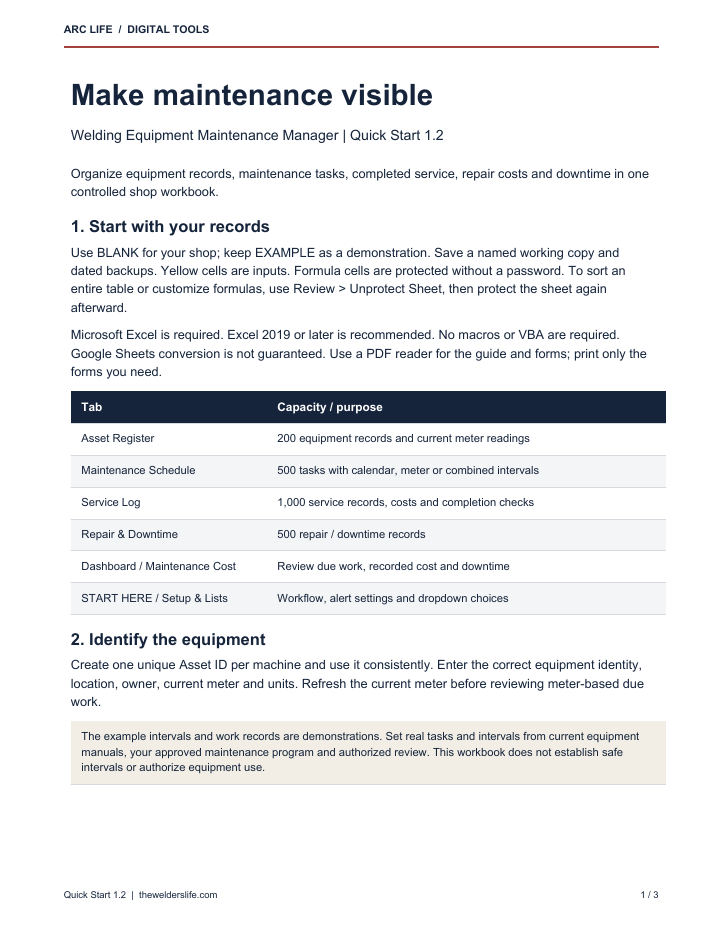
- 3-page Quick Start Guide PDF
- 6-page printable maintenance forms PDF
- Personal and one-business internal-use license PDF
- Customer README
- One organized customer ZIP for digital delivery
The workbook contains START HERE, Dashboard, Asset Register, Maintenance Schedule, Service Log, Repair & Downtime, Maintenance Cost, and Setup & Lists sheets. It uses standard Excel formulas and contains no VBA or macros.
Start with the BLANK copy; learn from EXAMPLE. Formula cells are protected without a password to help prevent accidental edits. Inputs remain editable. Unprotect the sheet before sorting an entire table or customizing formulas, then protect it again. Keep dated backups.
Built for
Welding and fabrication shop owners, maintenance leads, welding supervisors, instructors, purchasing employees, operations managers, and small-to-mid-sized manufacturing teams that maintain welding power sources, plasma systems, fume extraction, compressors, saws, positioners, ovens, material-handling equipment, cranes, and other recurring shop assets.
Frequently asked questions
What software do I need?
Microsoft Excel 2019 or later is recommended. Other spreadsheet applications may change formulas, charts, validation, or print settings.
Does it use macros?
No. The workbook uses standard formulas, tables, validation, conditional formatting.
Does it tell me the correct maintenance interval for my machine?
No. Demonstration tasks and intervals are examples only. Use the current manufacturer manual and your operation's qualified maintenance and inspection requirements.
Does the Service Log update the preventive-maintenance schedule automatically?
Yes, valid completed service records update the matching task when both Asset ID and Schedule ID match. Completed, Pass and Pass with Notes results can update the schedule. Enter older history in the yellow baseline date/meter columns and resolve missing, mismatched or duplicate-record warnings before relying on due status.
Does it replace a CMMS?
No. It is an Excel-based planning and recordkeeping system for smaller operations. It does not provide automatic notifications, work-order approvals, supplier integrations, mobile scanning, user permissions, or enterprise maintenance controls.
Is this a physical product?
No. This is a digital download. Nothing will be shipped.
Can I share it across my company?
The included license allows personal use or internal use by one business entity. It does not allow resale, redistribution, client delivery, or use in a competing template product.
Important operating note
This product schedules and documents maintenance; it does not determine what maintenance is safe or sufficient. The supplied records are demonstration data and must be replaced. Users must build real tasks and intervals from current manufacturer instructions, qualified-person requirements, applicable inspections, site procedures, operating conditions, and their safety program.
Digital download only; no physical item is included. Results depend on the completeness and accuracy of user-entered data. This product is a general planning and recordkeeping aid. It does not replace manufacturer instructions, qualified personnel, lockout/tagout, inspections, training, engineering judgment, safety procedures, regulatory requirements, accounting records, or production controls. Estimated downtime and replacement-review outputs are screening values, not guarantees or authorization to operate equipment. Refunds and returns are governed by the Arc Life store policy and applicable law.
Download and file help
Unzip the download before using the files. For file or download issues, contact Arc Life with the product name, order number and a short description. Do not send confidential customer or payment information. Digital-product terms are in the Refund Policy.
Share